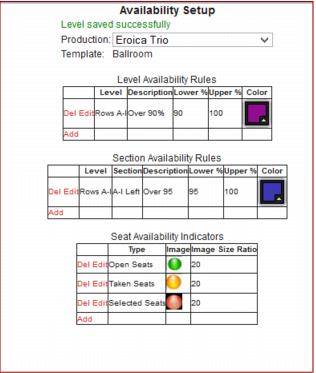
Availability setup
This tool can be accessed from SysManager > Activities > Reserved Seating > Production & Show Configuration > select the desired production > Productions edit screen and clicking on the Availability Setup button that opens a web-based window that allows venue administrators define Level and Section Availability Rules as well as the Seat Availability indicator images for that production.
An example URL for the web form:
http://localhost/Reservedseating/AdminAvailabilitySetup.aspx?ProdID=9, where the Parameter ProdID is the ID for the production we are editing in SysManager. This form loads with data for the Production we were editing in SysManager. The dropdown box also allows the user to change productions and reload their appropriate data in this form.