Locations
Inventory locations are those places where retail inventory is received and warehoused as well as those locations from where retail inventory items are sold. There needs to be at least one inventory location, although an unlimited number of warehousing and selling locations may be created. All selling locations have specific salespoints associated with them. The key is that the system cannot track inventory unless it is in a location recognized by the system when it is sold at a salespoint associated with that recognized location.
To create locations:
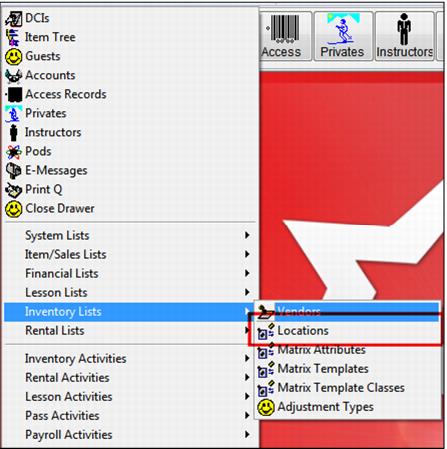
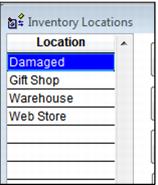
Go to SysManager > Activities > Inventory Lists > Locations. See the Inventory Location dialog in the following screen capture:
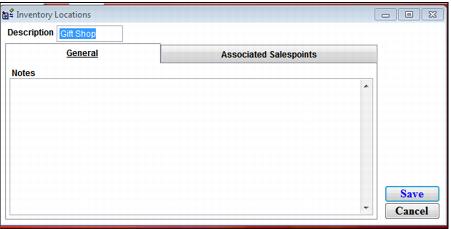
Click New and enter a Description for the location. Include any important Notes for this location.
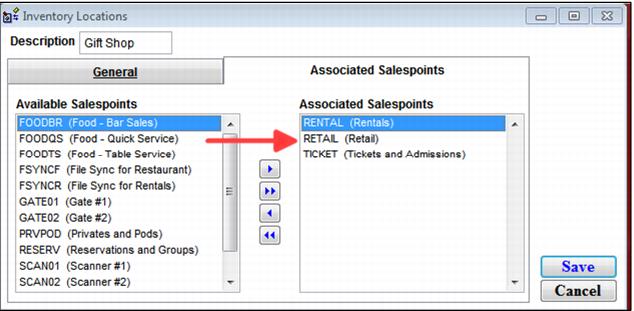
Now click on the Associated Salespoints tab. Move all the salespoints to be associated with (selling at) this location from the Available Salespoints pane to the Associated Salespoints pane. Save your entries.
Remember that it is not necessary to associate a salespoint with every location, a central warehouse, for example. However, it is necessary to associate each salespoint at a selling location to that location in order for accurate inventory management to occur.
Warning: A salespoint is never associated with more than one location.