Reporting Services security
Siriusware Inc. recommends that clients utilize Active Directory groups to control access to the reports on their Reporting Services sites. For example, there may be some everyday reports that most users need access to, as well as some reports containing data that is only accessed by managers. In that case, the Network Administrator could create two distinct Active Directory groups, siriususers and siriusmgrs. These groups could then be granted access to specific reports or groups of reports.
It is important to understand that the location from which you begin the process below determines the objects to which the security applies. In other words, if you start from the site’s Home page, the security settings apply to the entire site. If you start from a specific folder, they apply to the contents of that folder. If you start from a specific report, they apply to that report.
Example:
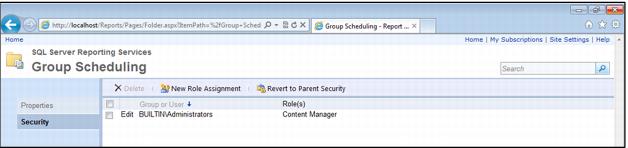
Apply new security settings to the reports in the Group Scheduling folder:
1. Hover over the folder name, click on the dropdown arrow, and then select Security.
Note: If you are editing the security for anything other than the Home page, you receive a warning that you are about to apply security settings that are different from the parent item. Click OK.
2. Click New Role Assignment.
3. Enter the domain and group (or user) name in the Group or user name text box. Though there is no lookup function, the server verifies that the user or group exists before applying the security changes.
4. For most groups and applications, the Browser security role is applied. This is essentially read-only access to the reports and the Reporting Services site. The Content Manager role is limited to only those who administer the site (by default, the built-in administrators for the server are granted the Content Manager role).
5. Click OK.