Add the server to the list of intranet sites
When the Reporting Services web site is accessed, the user is prompted for a valid Windows or Domain username and password. There is a check box to save the credentials, but it is possible users will still be prompted (after a reboot for example). To prevent this, follow the following steps to add the server to the local intranet zone in Internet Explorer:
1. Click the
Tools icon (

) in the top right of the Internet Explorer window.
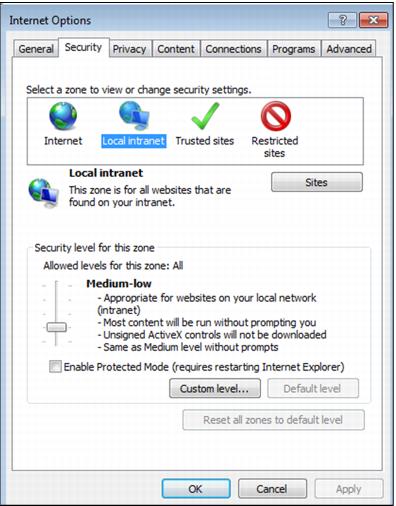
2. Click Internet Options.
3. Go to the Security tab and click Local Intranet.
4. Click the Sites button.
5. Click the Advanced button.
6. In the text box at the top type http://servername, and then click Add.
7. Click Close and OK on the other two dialog boxes.
Note: These steps apply only to Internet Explorer 9.