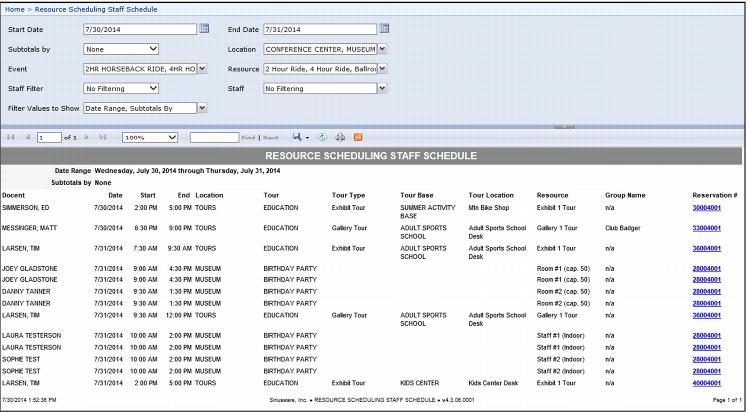
Resource Scheduling Staff Schedule Report
This new report displays the Resource Scheduling staff schedule. Filtering options include Date, Location, Event, Resource and Staff. The Staff filter option only lists staff that are assigned to Resource Schedule Staff items. Subtotal options group by Staff, Date or None.
When using this report, the user has the ability to filter by Assigned Staff or No Filtering. If the Assigned Staff option is selected, the Staff options are added to a multi select list.
Note: Staff members do not appear in the dropdown if you have assigned staff via the Message field. Only staff that have been assigned to Resource Schedule Staff items in the resource calendar, within the date range on the report, appear as filterable options. If the user wishes to see all (old and new) staff assignments they can select Staff in the Subtotals by and No Filtering in the staff filter.