Using Excel
You can use Microsoft Excel for reporting purposes as well. The following are the points that you need to keep in mind:
1. Microsoft Excel can be used to create custom reports that can be re-formatted as required or exported for other uses.
2. Care should be taken when using this approach. It has been reported that certain more complex or data connection-intensive reports have locked the server data, causing salespoint crashes.
3. You may need a specific ODBC connection on your computer as well as Microsoft Query in order for you to use Excel for custom reports.
The following are the general steps to follow to generate an Excel Report.
1. Open Excel and go to Data > Import External Data > New Database Query.
2. Select the SiriusSQL database to which you want to connect.
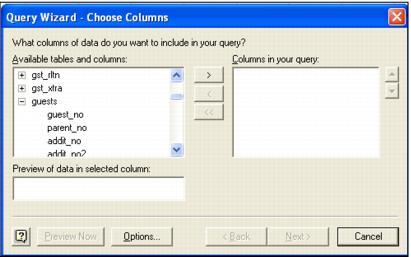
3. You may want to check Use Query Wizard. Click OK to connect to the data. The Query Wizard displays a list of available tables, each of which can be expanded to show the columns (fields) in that table. See the following screen capture: