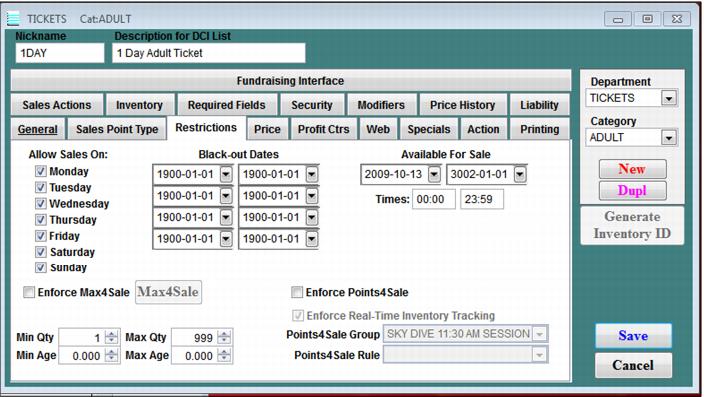
Setting | Description |
Allow Sales On: | You can select the days of the week when the item is available for sale by clicking the check box to the left of each day. |
Black-out Dates | You can assign up to four date ranges during which the item is not available. Note: SysManager lets you define a Black-out Dates range that is the same as the Available For Sale date range, even though this makes the item unavailable all the time. Carefully set up your restrictions to make sure you are restricting items in the way that you mean to restrict them. |
Available for Sale | You can assign a period during which the item is available for sale. This is the easiest method of restriction for a product that is good for only a short period of time. You can also use the Times field to select a period of time during which the item is available for sale on the valid dates. |
Enforce Max4Sale | Max4Sale limits can be set for an entire department, for an entire category, or for particular items. Max4Sale capability allows you to define sale quantity restrictions for limited resource products for certain date and time ranges by department, category or item. See How to limit quantity sold (Max4Sale). A different limit can be assigned to each day, each hour, or any other period you like. Once the maximum number allowed is reached, Sales does not allow any more of this particular item to be sold for that date and time range without a warning. Operators with sufficient security can sell over the Max4Sale limit. A limit on a department allows only so many products from that department to be sold before a warning is displayed. A category limit allows only so many products from that category to be sold before a warning is displayed. If the limit is assigned to a particular product, only so many of that product can be sold before a warning is displayed. For example, you can force the system to allow only ten horseback rides to be sold within a given hour before a warning is displayed. When combined, the most restrictive Max4Sale limits override the others − for example, if you can sell ten of a given product in a day, but the department is limited to selling five in a day, only five of the product are allowed to be sold before the warning is displayed. Operator security levels determine whether an operator can sell beyond the assigned limits. The quantity of a limited product available for sale is display in the item list on the salespoint. If the operator does not have sufficient security to sell over the assigned limits, products that are sold out are not displayed at the salespoint for selection. If operator security is sufficient to sell over assigned limits, all products are displayed and sold out products show an available number of 0 or less. If salespoints are running standalone (disconnected from SalesEZ application), only operators with sufficient security are able to sell products with Max4sale limits on them. These products have a ? following them because the number available is not known and is only be visible to operators with sufficient security to sell over Max4Sale limits. A Max4sale check is performed when the product is selected for sale, and a second time when the sale is finalized. Selecting a product for sale does not reserve it, and that product may be sold between its selection and finalization by another salespoint. If upon finalization the product is no longer available, the message, “This Violates Server Restrictions, Override?” is displayed and an operator with sufficient security may log in to finalize the sale and sell over the Max4Sale limit. When the Enforce Max4Sale check box is selected, the Enforce Real-Time Inventory Tracking check box also becomes available for use (in addition to the Max4Sale button). For more information on this setting, see the Salesware E-Commerce document. |
Min Qty/MaxQty | You have the option of assigning a minimum and maximum quantity of an item that can be sold. If an operator tries to sell more than the Max Qty, a message that the quantity is too high is displayed, and operators cannot sell over the Max Qty. Usually the Min Qty is set to 1; however, this field can be used in conjunction with a group sale product, so that the Min Qty can be set to the minimum number of persons required for the group rate. This is not security controlled. Even the Admin operator cannot set the quantity beyond the restriction. The min/max quantity is based on the line item, not the entire sale. So a min/max of two would only allow the quantity of that item to be set to 2, although you could sell any amount within a given sale − just two at a time per line item. |
Min Age/Max Age | You have the option to assign a minimum and maximum age required to purchase an item that can be sold. |
Enforce Points4Sale | By checking this box, you will affect the performance of item tree displays in Sales. |
Points4Sale Group | Enables you to select the specific item |
Points4Sale Rule | Enables you to attach a rule |