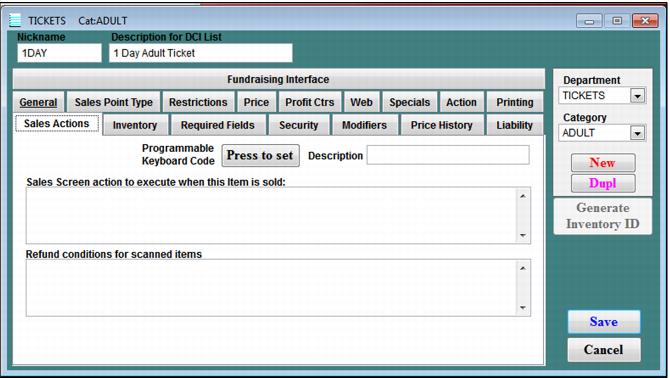
Sales Actions tab
The Sales Actions tab is used to cause an action to be performed when an item is sold. It is also used to configure items to be sold with single keystrokes (to enable operators to work faster). The Sales Action dialog is shown in the following screen capture.
• Sales Screen action to execute when this item is sold - When this item is sold, Sales automatically performs the following action. For example: apply a special, sell a designated item, or change quantity. See Salesware User Guide for Advanced Users for a description of the Sales screen action macros that can be used here.
• Refund conditions for scanned items – Enter conditions for adding this product to the sale when the product is returned using the auto-refund feature. Conditions consist of a statement that states, “between x minutes and y minutes since purchase, sell z of this product.” Conditions must be specified in the following format:
RFND(starttime,endtime,quantity)
• starttime is the start time of the time range during which this product is added to the sale in minutes since purchase
• endtime is the end time of the time range during which this product is added to the sale in minutes since purchase
• quantity is the number of this product to add to the sale when the auto refund product is returned
Example:
RFND(0,240,-1)
This says that: If this product is returned between 0 and 45 minutes after purchase, sell -1 of this product.
Note: You can have more than one RFND statement for a given product. Separate each one with a blank space. If you want different sales actions to occur at different times (sell quantity 1 between this timeframe, but quantity 2 between another timeframe, etc.), then you would need to use more than one RFND statement.
For information on how to use %F along with RFND for automated refunds, see the Salesware Validation document.