Step #1 – Configuring the accounts
1. Set up an account for each vendor who sells consignment tickets.
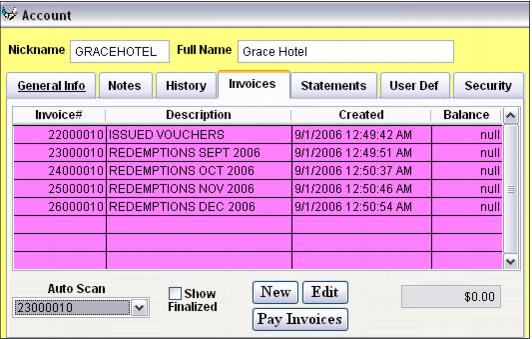
2. Set up an invoice within each account for issuing vouchers. This invoice is used whenever vouchers are issued so that there is a nice, “clean” record of all vouchers sold to the account.
3. Set up a second invoice that is used for tracking the redemptions.
4. Important! Make sure to select the invoice that is used for recording redemptions in the Auto Scan field. Without this step, redeemed tickets are not recorded back to the account!
The invoice used for the auto scan varies based on how you bill your hotels/tour operators:
• If you are collecting pre-payment and won’t ever send the hotel/tour operator the invoice used to track redemptions, you only need to configure one auto scan invoice for tracking the redemptions.
• If you need to bill the hotel/tour operator on a regular basis (or if you just want to track redemptions on separate invoices throughout regular time intervals), you need to set up multiple auto scan invoices for tracking redemptions.
When using multiple auto scan invoices, the process is to select an auto scan invoice for the account and allow redemptions to be tracked to that invoice for X number of days. When you are ready to bill the hotel/tour operator, edit the account and select a different auto scan invoice for tracking future redemptions. You may then print a statement for the invoice previously used as the auto scan invoice and send it to the hotel/tour operator.