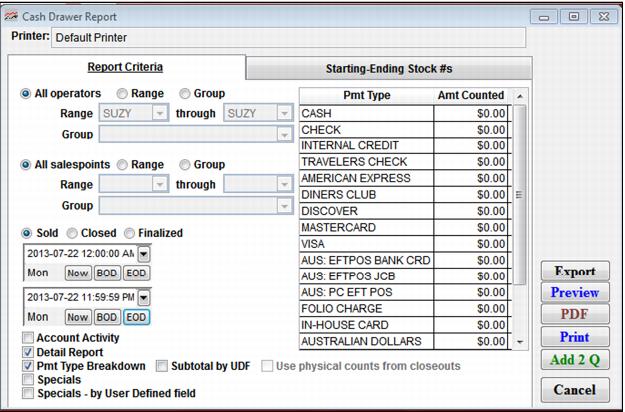
Setting | Description |
Filter Operators | Select a range of operators to include in the report. |
All salespoints | Select this to view all salespoints (default). |
Range | Select this to specify a range of salespoints for this report. |
Group | Select this to specify a range of salespoint groups for this report. |
Sold | Select this to report by items sold during the specified time period. |
Closed | Select this to report by when drawer was submitted from salespoint. |
Finalized | Select this to report when the closed drawer finalized via ReportManager. |
Date Range | Enter a date range for which to generate a report using the Beginning and Ending Date fields. |
Pmt Type | A list of available payment types. |
Amt Counted | Enter the amounts counted for actual receipts for each payment type. |
Account Activity | Select this to include a section of the report on account activity (which includes Account name for transactions). |
Detail Report | Select this to see a line by line (transaction by transaction) report of everything that was done during the period, including messages input, pass numbers sold, guest information, account names, and specials applied; if you are selling passes, you can see to whom the operator sold passes. Note: A single transaction that includes multiple guest records lists only the first guest name on the report. |
Pmt Type Breakdown | Select this to see how the receipts gathered compare to the payment information entered at the salespoint (Over/Short report). Note: The over and short information calculated by this portion of the report is not stored anywhere in Sales. Therefore, if you want to save this information for future reference, you either keep a copy of the report, or print it again in the future with the same criteria. |
Subtotal by UDF | Select this to report subtotals by user defined fields. |
Use physical counts from closeouts | Select this if you want the report to use the operator’s entered amounts when the salespoint was closed out, rather than physically counting and entering the amounts here. |
Specials | Select this to include a section of the report on specials. |
Specials – by User Defined field | Select this to include a section of the report on specials by User Defined field. |