Setting | Description |
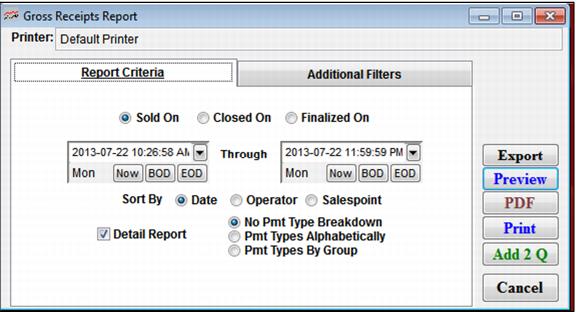
Sold On | Select this to report by items sold during the specified time period. |
Closed On | Select this to report by when drawer was submitted from salespoint. |
Finalized On | Select this to report when the closed drawer finalized via ReportManager. |
… Through … | Enter a date range for which to generate a report using the beginning and ending date fields. |
Sort By | Choose a field by which the data in the report is sorted. |
Detail Report | Select this to see the data transaction by transaction. |
No Pmt Type Breakdown | Select this not to report how the receipts gathered compare to the payment information entered at the salespoint (Over/Short Report). |
Pmt Types Alphabetically | Select this box to see the payment type breakdown alphabetically by payment type. |
Pmt Types by Group | Select this to see the payment type breakdown by Pmt Type Group, as defined in SysManager > Activities > Financial Lists > Payment Types. |