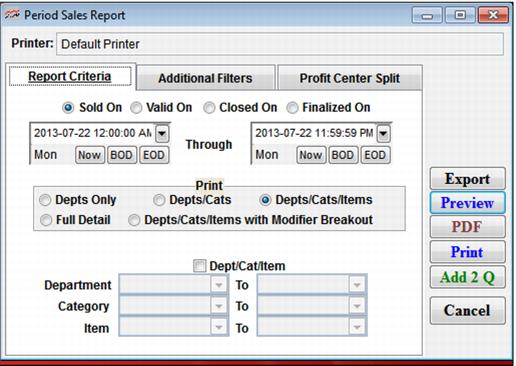
Setting | Description |
Sold On | Select this to report by items sold during the specified time period. |
Valid On | Select this to report by items valid during the specified time period. |
Closed On | Select this to report by items when drawer was submitted from salespoint. |
Finalized On | When the closed drawer finalized via ReportManager. |
Date Range | Select a date range for which to print Items sold using the Beginning and Ending Date fields. |
Print: Depts Only; Depts/Cats; Depts/Cats/Items; Full Detail; Depts/Cats/Items with Modifier Breakout | Select the level of product detail for the report. |
Dept/Cat/Item | Select this if you want to report on a range of items instead of all. |