Setting | Description |
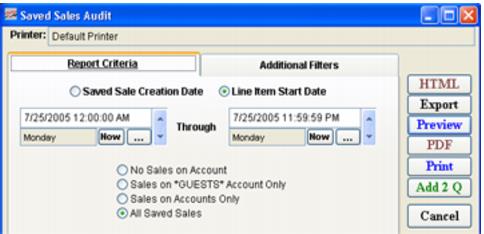
Saved Sale Creation Date | Select this to view saved sales by date of transaction. |
Line Item Start Date | Select this to view saved sales by start date of products. Note: The start date option uses the date/time on the global DateTime button in Sales for each sale − if this date for a given sale falls within the specified range, all line items from that sale are included, no matter what they are set to individually. |
Date Range | Enter a date range for which you would like to view saved sales using the Beginning and Ending Date fields. |
No Sales on Account | Select this to exclude sales on account from the report. |
Sales on *GUESTS* Account Only | Select this to report on saved sales on *GUESTS* account only. Note: Saved sales that are not done on a specific account are saved in a generic account called *GUESTS*. |
Sales on Accounts Only | Select this to report on saved sales on account only. |
All Saved Sales | Select this to report on all saved sales (default). |