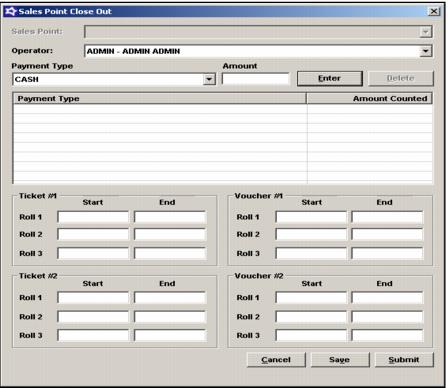
The operator closes out the salespoint from the salespoint
1. Close Out button – Shows who is logged in; security setting allows you to close out anyone.
• Close Out Report from salespoint is different from ReportManager Close Out Report.
• You don't officially have to close a credit card batch – except when using DirectNet and Moneris. Credit card close out can be a different process.
2. Sales close out – Click the Close Out button on the main Sales screen
• Payment Types and Amounts
• Ticket #s
• Saving the close out
• Credit cards
• Submitting the close out
Note: The Sales Point Close Out dialog looks somewhat different and displays when [Preferences] Tips=TRUE in the Sales32c.INI file. For example, it includes the Payout Tips button.