Validation overview
Validation is a general term used to refer to the process of scanning, swiping or manually entering an access, pass, addit_no, card or guest number in order to authorize purchases, discounts or entrances into restricted areas. There are many ways that validation programs may be implemented. This document:
• Discusses the two general types of validation – auto-validation and validation with a DCI.
• Documents how to configure Salesware module for access and pass record validation.
• Looks at some additional functionality that may be included in validation programs, such as cascading validation.
• Looks at configuring barcode and magnetic swipe fields on Pass and Ticket layouts in order to produce the required functionality at the point-of-sale or when using remote scanning applications such as ScanMan and GateKeeper.
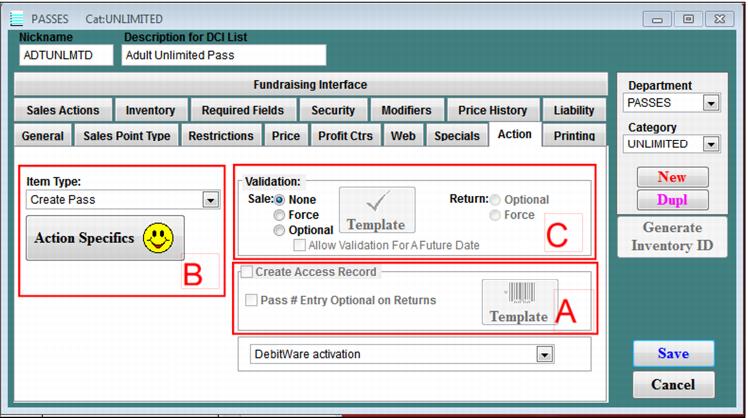
The three major sections of the document describe how to use the three sections shown in the following screen capture of the SysManager > Activities > DCIs > New/Edit > Action tab for an item:
The three sections map to the following parts of this document: