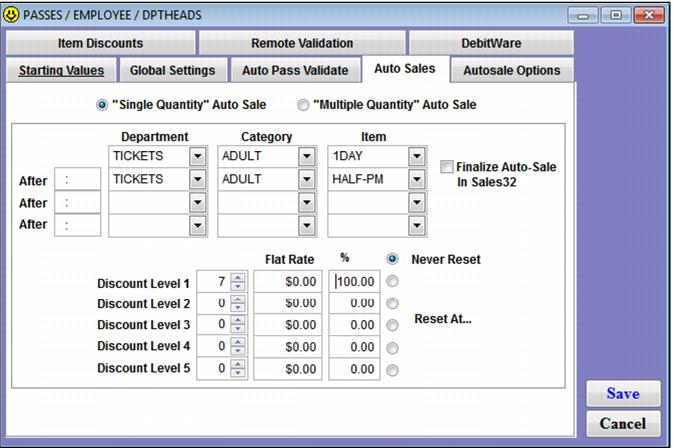
Auto Sales tab
The Auto Sales tab provides two separate dialogs, selected using the “Single Quantity” Auto Sale and “Multiple Quantity” Auto Sale radio buttons. Multiple quantity Auto Sales are documented in the Salesware Memberships and Passes document.
The Auto Sales tab with the “Single Quantity” Auto Sale radio button selected is the place to select an item that is auto-sold whenever the pass is auto-validated. This auto-sale can occur remotely via scanning applications such as GateKeeper and ScanMan or it can occur within the Sales application. Only one item may be selected for auto-sale per pass DCI, although the item auto-sold can vary based on the time of day. The Discount functionality can be used in conjunction with Auto Sales in order to discount the auto-sold item at certain intervals. Any configuration on the Auto Sales tab affects all passes of that DCI – both existing passes and those yet to be sold.
Example:
A frequent use card is presented to an operator. When this card is auto-validated (scanned or swiped) in Sales between 9 AM and noon, a 1 Day Adult ticket is auto-sold. When the card is auto-validated (scanned or swiped) in Sales from 12:01 PM – 5 PM, a ½ Day Adult ticket is auto-sold. The seventh time this happens, the ticket that is auto-sold is discounted by 100% and the “counter” is reset to start the process over again.