Deducting/adding value
The value to deduct or add to a pass is configured on the Validation tab within the Validation Template. The Uses/Points/Money specified here is deducted or added to a pass record every time a pass is entered for validation – regardless if it is the first or fiftieth time that the same pass number has been entered for validation within the same day.
Note: This is a big difference from auto-validation where the addition or subtraction of values on first vs. subsequent scans may be specified.
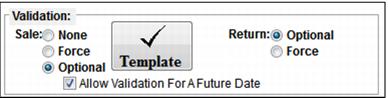
Validation Templates that deduct a daily use can actually be validated more than once on the same day even if only a single use per day is specified. This can be done if item’s start date in Sales is set to future dates for subsequent uses. Once a “future” daily use has been redeemed, any validation for that same future date using the same pass fails. To turn this option on for an item, the Allow Validation For A Future Date option must be checked.
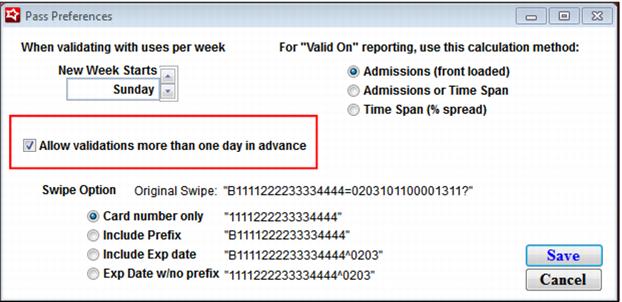
This future validation can be limited to just next day sales or it can be allowed for any future date. To limit the future validation functionality to only next day sales, go to SysManager > Preferences > Passes and un-check the Allow validations more than one day in advance check box.