Configuration
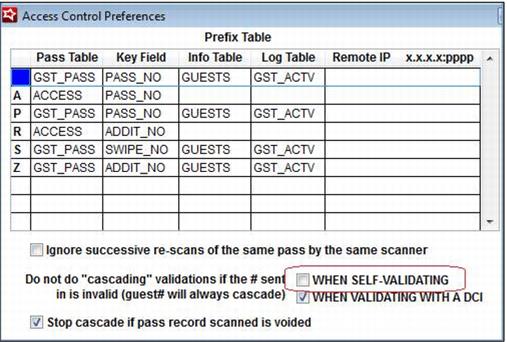
1. The WHEN SELF-VALIDATING box must be un-checked within Preferences > Access Control.
Warning: This also turns on cascading validation for scans at the lift/gate or %AA auto-sale scans in Sales.
The WHEN VALIDATING WITH A DCI check box doesn’t impact the %EP cascading, so having that checked or un-checked is irrelevant. The Stop cascade if pass record scanned is voided setting applies to the %EP cascade in the same way it does for other cascading programs. If the pass record scanned is voided, it does not cascade. This helps prevent a guest from using a pass that has been reported lost or stolen, and subsequently replaced, from receiving discounts/benefits by cascading to the replacement pass.
2. When configuring the Global Settings for a pass, select Full Cascading Validation. Usually, we select the Check for Void and Date Range option, and that option is still totally valid, especially for those who typically issue a new card with each pass purchase. But, for clients who have their customers keep the same card and use cascading validation, the Full Cascading Validation is the better option.
Note: Axess Gate clients need to be set up for Full Cascading Validation to allow reloads of season passes purchases from year to year to honor the current year’s discounts.