Access Control
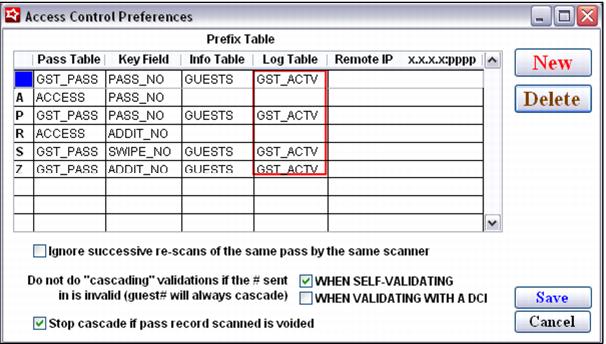
• The Access Control grid specifies the lettered prefix used in layouts that distinguishes the various types of numbers used in validation programs. Based on the prefix, the validation is directed to the appropriate table to determine the rules for validating the item.
Note: The Log Table and Remote IP fields are no longer necessary in version 4.3.
• Ignore successive re-scans of the same pass by the same scanner is beneficial in gate scanning that involves RF chips. Depending on the sensitivity of the RF reader, the chip embedded in a card may be read multiple times in quick succession. This can cause “first” and “subsequent” validations to occur within seconds of each other. If the product is configured to deduct values each time the pass is scanned, then the subsequent validations may fail and essentially prevent the turnstile from flipping as expected.
• Every time a scanner (not a salespoint) calls SalesEZ’s CheckPass function, SalesEZ application keeps a record, by operator, in the lastscan table that records the prefix, pass number and response when CheckPass is finished. Every time CheckPass is called, it first checks the lastscan table (if the Ignore successive re-scans of same pass by the same scanner check box is checked) to see if the same operator is submitting the same prefix number and pass number. If so, then it simply returns RESCAN with the original response. Note that this is only by operator. If the same pass is immediately rescanned on a different scanner with a different operator log-in, it’s not considered a rescan. This functionality applies to access items as well as passes.
• Do not do “cascading” validations if the # sent in is invalid (guest# will always cascade) allows cascading validation of pass numbers to be turned on or off based on auto-validation (self-validating) or validation with a DCI.
• Stop cascade if pass record scanned is voided activates a verification of the pass record Voided By/Voided For fields. If these fields are empty the cascade proceeds. If they are populated, the cascade stops and the validation fails. This option is available when validating with pass, addit_no, swipe_no or card numbers.
Note: The
Log Table and
Remote IP fields are no longer necessary in version 4.3. The
Log Table fields, highlighted in the screen capture, may be populated by default but are blank, as described in the following known issue:
http://portal.siriusware.com/docs/kb-pdf/Known_issues/SysManager_2008_Dec_23.pdf.