Location and operator input
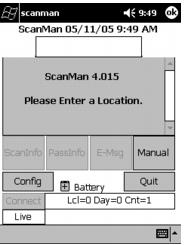
When the program is launched, the first thing the user must do is enter the location and operator. This can be done through the Manual dialog or more commonly (and conveniently) these are barcodes that are scanned.
This is entered using the following format:
LOCxxxxxx
OPxxxxxx
Where, xxxxxx is a unique six-character Location or Operator ID.
Example:
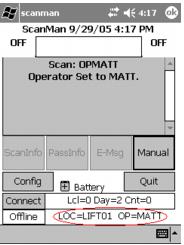
LOCLIFT1 sets the location to LIFT1.
OPMATT sets the operator to MATT.
After these have been entered, the settings are displayed at the bottom of the screen in ScanMan module.
These barcodes can be created using Microsoft Word on a computer with the Salesware Common Files application installed by using the BC C39 2 to 1 Narrow, Regular, Size 30 font. Be sure to add asterisks (*) before and after the text you want printed in 3of9. For more information on barcodes, see
ScanMan configuration barcodes.
Note: See section on
LocOp for additional information.
At any time during operation a different Location barcode or Operator barcode can be scanned to change either the Location or the Operator for that unit. However, if you are typing them, re-starting the program is necessary.