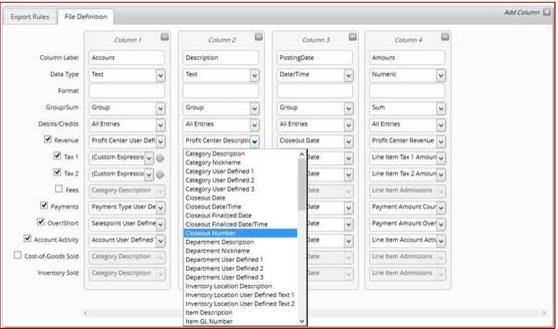
Column details
For each column and each type of row selected, the user must select from a dropdown list of available values. Those available values vary based on the Data Type of the column and the type of data in the row. In other words, you can’t select a Profit Center Description in a numeric column and you cannot select a Payment Type Description in a Revenue row (you can report revenue by Profit Center, Department, Category and many other things, but not by Payment Type. Much like you don’t report payments by Profit Center).
Important: Combining Profit Center-related values and Line Item-related values within a single row can cause inflation of certain Line Item data. For example, if an admissions product’s revenue is split into two Profit Centers, and your File Definition includes column values for both Profit Center Revenue and Line Item Admissions, then that particular item’s admissions are reported twice: once for each Profit Center.
For a detailed listing of each available column value and its availability by row type, see
Appendix A.