Global, group and local .INI functionality for Sales
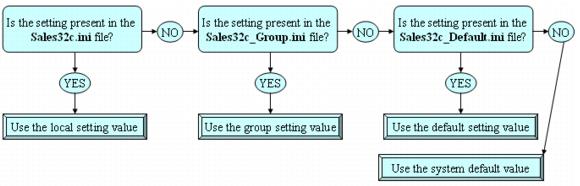
This section explains global, group and local Sales settings (.INI settings), how they work and how to set them up. The following diagram provides a summary of the information presented in this section.
Prior to 4.0, a local Sales32c.INI file resided on each salespoint to provide settings unique to that salespoint for Sales to read and respond to. In 4.0, there was a desire to be able to simplify setting up defaults for all salespoints, as well as to have groups of salespoints that were uniform in their look and function whose settings could be changed once in one location, rather than individually at each salespoint location.
Settings for how Sales functions and looks can be set resort-wide (global), by defining groups, or at each salespoint. Global settings prevail when those settings are not defined at the group level or at the local salespoint. Group settings prevail over global settings, and local settings prevail over group and global settings.
To access the global and group settings, go to the SysManager > Preferences > Miscellaneous > Global Salespoint INI tab.