Selling and activating
The following are the key points to remember about selling and activating In-House Cards items:
• In-House Cards items can either be sold and activated later (two steps) or sold and activated at the same time (one step). When a sale containing an Activation item is finalized, an invoice is created in the account specified within the DCI of the In-House Cards card. Once a card is activated, all activity is tracked back to that invoice.
• Multiple In-House Cards items can be activated in the same sale. Remember that selling and activating can be one step or two, depending on your program rules!
• All In-House Cards items activated on separate line items (qty=1) have unique invoices. The cards are not linked to the same invoice.
• In-House Cards items that are activated on the same line item (qty>1) are automatically linked together.
• You can change this behavior so that In-House Cards items are never linked together even when activated on the same line item. Do this with the following Sales32c.INI setting: DWLineItemLink=FALSE.
• Even with this setting, the operator can manually link invoices together. DWLineItemLink=FALSE just changes the default behavior.
• To sell an In-House Cards card that is activated at the time of sale, simply add the item to the sale, click the Set Guest button and enter a guest name.
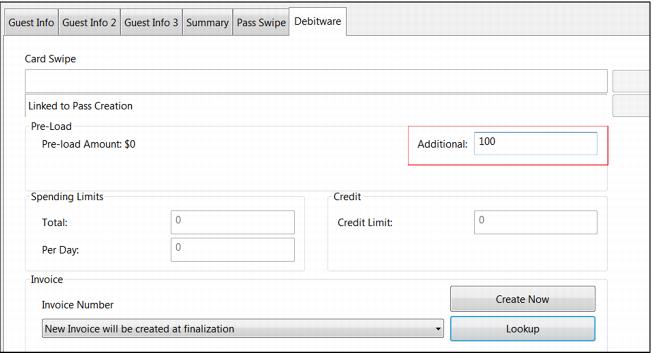
• To load money onto the card, click on the DebitWare tab and enter the amount requested by the guest into the Additional field.
Note: that if you are selling an item configured with a pre-load amount, that amount is displayed next to the Pre-load Amount: label.
Note: The amount to be loaded on the card is displayed under the In-House Cards item.
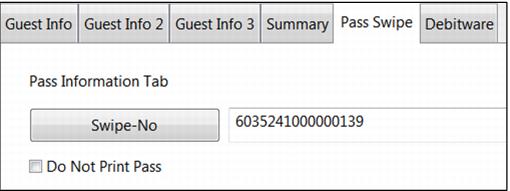
• If assigning a card number from a pre-printed/pre-encoded stack of cards (as opposed to having the system issue a card number) the operator is required to click on the Pass Swipe tab and enter a card number in the swipe_no field. A Sales32c.INI setting can help ensure that the number entered into the Pass Swipe tab is unique: PassSwipeUnique=TRUE.
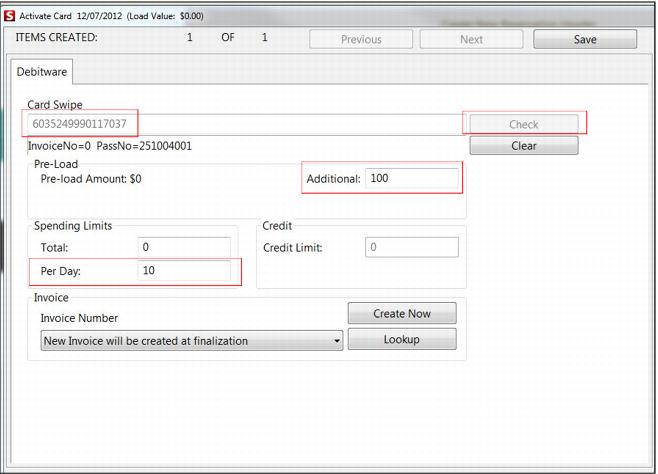
• Daily, total and credit limits may also be assigned at the time of activation, assuming that the In-House Cards item is configured to allow access to these limits (see
Item configuration).
• Finalize the sale to activate the card(s) and collect any load amounts.
• To sell an In-House Cards item that is not activated at the time of sale, simply add the item to the sale, click Set Guest, attach a guest name and Finalize the sale.
• Later, when the guest decides to activate his card, the operator adds a DebitWare activation item to the sale, clicks the DebitWare button, swipes the card into the Card Swipe field and clicks the Check button. The operator may then load money onto the card or adjust any other limit fields as appropriate (based on whether or not the item allows modification of these fields).