Rental Shops
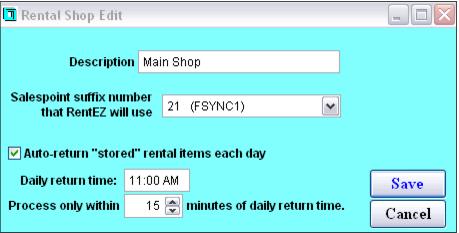
The Rental Shops list is used to define distinct rental shops that all use the Salesware Rentals module. Equipment is assigned to a “home” shop so that it is possible to link specific inventory to a specific location. The current location of the inventory is also tracked when equipment is exchanged or stored or returned to a rental shop other than its “home” shop. Rental shop configuration requires a description and the salespoint suffix of the salespoint configured for use with RentEZ at each shop.
Optionally, there is a SQL Server Agent Job that can be used to auto-return equipment currently in storage at a specified time of day per rental shop. For instance, at the main rental shop all equipment that is still in storage as of 11:00 AM is “auto-returned,” which marks the equipment as returned to the “home” location for each piece of equipment that goes through this process. This prevents guests from having to retrieve equipment out of storage only to return it moments later.
In order to implement this functionality, follow the
Auto-return from storage instructions.
Note: Users get a warning when the item being returned in TechStation does not belong to the Home Location as set in the TechStation settings. The warning displays the rental shop which the item belongs to.