Auto-Adding of Modifiers
These rules look at what type/level of inventory is checked out to the Rental form (contract) and based on the combo of types and levels adds the appropriate modifier (from the list of “regular” items with prices/profit centers configured previously).
Example:
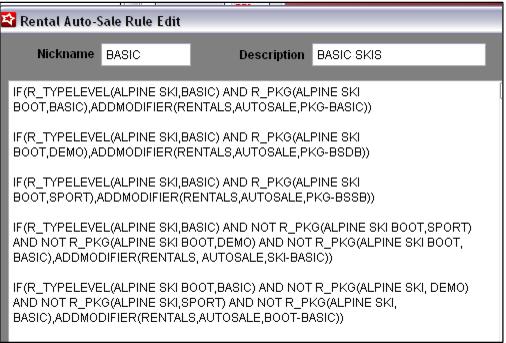
• The first line says, if the inventory attached is a type and level of ALPINE SKI, BASIC and there is also an ALPINE BOOT, BASIC piece of inventory attached to the form, add the Basic Ski Package modifier (the RENTALS, AUTOSALE, PKG-BASIC item).
• The second line says, if the inventory attached is a type and level of ALPINE SKI, BASIC and there is also an ALPINE BOOT, DEMO piece of inventory attached to the form, add the Basic Ski/Demo Boot Package modifier (the RENTALS, AUTOSALE, PKG-BSDB item).
• The third line says, if the inventory attached is a type and level of ALPINE SKI, BASIC and there is also an ALPINE BOOT, SPORT piece of inventory attached to the form, add the Basic Ski/Sport Boot Package modifier (the RENTALS, AUTOSALE, PKG-BSSB item).
• The fourth line says, if the inventory attached is a type and level of ALPINE SKI, BASIC and there is not an ALPINE BOOT, SPORT, ALPINE BOOT, DEMO or ALPINE BOOT, SPORT piece of inventory attached to the form, add the Basic Skis Only modifier (the RENTALS, AUTOSALE, SKI-BASIC item).
• The fifth line says, if the inventory attached is a type and level of ALPINE BOOT, BASIC and there is not an ALPINE SKI, DEMO, ALPINE SKI, SPORT or ALPINE SKI, BASIC piece of inventory attached to the form, add the Basic Ski Boots Only modifier (the RENTALS, AUTOSALE, BOOT-BASIC item).
Once you get the pattern established, you can swap out the type/level/DCI relatively easy in other rules. This Basic Ski Rule is also the most complex in the sample data.
Example:
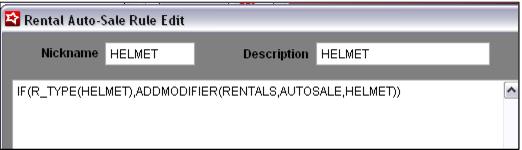
• This says is if there is a piece of rental inventory attached that is a HELMET type, add the Helmet modifier.