Combining sub-rules
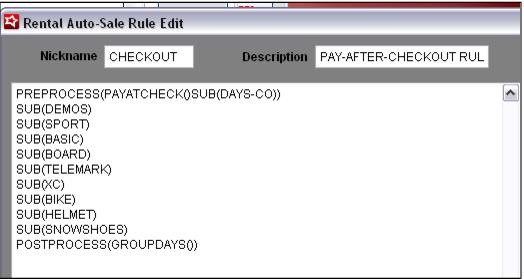
Once all the parts (sub-rules) are created, you are ready to create the “master” rule that is attached to your Rental Contract item.
• The PREPROCESS says that
1. We are using a Pay-After-Checkout process, not a Pay-After-Return process.
2. Our Day definitions can be found in the SUB(DAYS-CO) rule.
• The other SUB rules are all those rules where we define what modifier item to add based on the type/level of equipment checked out to the form.
• The POSTPROCESS says, to group the same modifier DCIs into a single line and add the number of days to that line. This goes back to the example of a single modifier of BASIC SKI PACKAGE with a description of 3 FULL DAYS instead of having three separate BASIC SKI PACKAGE modifiers each with a description of 1 FULL DAY added to the Rental Contract item.
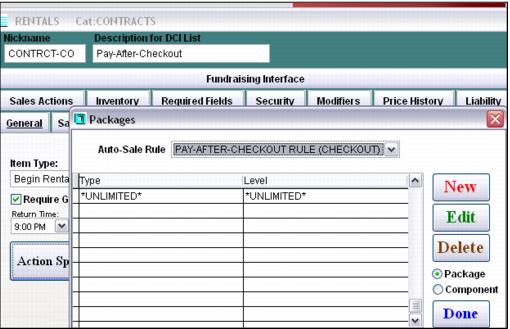
Important: This is the rule you attach to your Rental Contract item (the one processed at Self Entry) within the Begin Rental > Action Specifics.