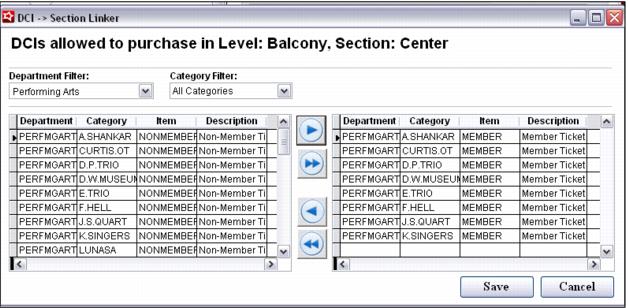
Section: DCI links
If necessary, Sections can be restricted to specific ticket items. For instance, the Venue template may have a Members-Only section that can only be booked when purchasing a Member ticket to a given Show. To create a restriction on the type of ticket that must be purchased in order to get a seat in a particular Section, click on the Section to be restricted and press the Edit Pass Links button. This brings up a dialog that allows the DCIs of ticket items to be moved from the left to the right. All DCIs shown in the right-hand list are able to be booked into the Level/Section.
Note: The Edit Pass Links process is completed after the corresponding ticket items for various Shows have been configured. If there are no restrictions based on Ticket Type (DCI) to the Level/Section, there is no need to go through the Edit Pass Links configuration step.