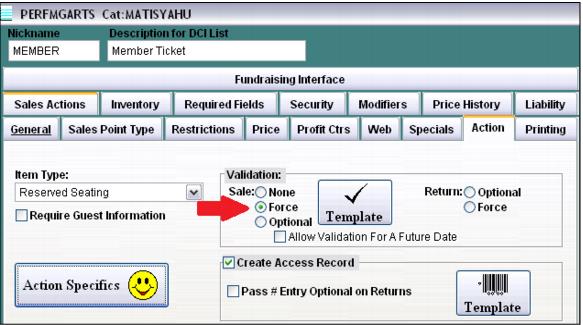
Required validation
If the ticket item is specific to members and requires the entry of a membership number as part of the purchase process, select Force for the Validation template. Within the Validation template, standard configuration options can be set.
Currently, only one membership number can be entered per line item during the seat selection process. This means the same membership number is used for all quantities of the line item. To ease the process for Sales operators and for proper processing of E-Commerce module transactions in Web Sales Host utility, check the Multiple Validations box found within the Template. This box is used by Sales to assume the same membership number for all quantities of the line item instead of requiring the entry of a membership number per quantity.
Note: If members are not limited to X number of discounted member tickets, a typical configuration would be to check the Multiple validations box on the Validation tab (this allows for one membership number to be used across all line item quantities) and to restrict the validation to eligible member pass DCIs on the Item/Pass Relationships tab.
Forced validation Reserved Seating tickets do not allow a search for available seats until you have entered a valid member. After entering a valid member, the search is allowed. The number entered at validation is passed back to Sales so that the operator doesn't have to re-validate the purchase. In E-Commerce module, the number is already entered in the cart.
Note: In order to validate in Reserved Seating or in E-Commerce modules, ww.dll must be configured to do so. Also, ww.INI must be configured with the appropriate [Validation] settings.
Example:
[Validation]
SalesEZ=127.0.0.1:4203
RolloverMonth=
CheckExp=FALSE
PrependList=
Extract=
CardPrefixes='B'
NoDecryptPrefixes='A,P'
Location=1