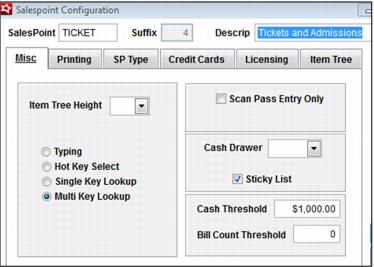
Configuration of Cash Thresholds
Thresholds are set in SysManager at the salespoint level. A threshold of $0 means that those salespoints are not monitored for cash activity.
Note: Even though most clients closeout by operator, the notifications are salespoint specific, because typically these notifications are used to let a vault staff member know to visit a certain area of the business to collect cash. The actual skims are recorded for either the operator or salespoint depending on the closeout method, but the automated notifications are based on the location experiencing heavy cash flow.
In SysManager, edit a salespoint (SysManager > Activities > System Lists > Salespoints) and enter the Cash Threshold amount that generates the automated alert. When a salespoint is configured with Cash Thresholds, data is written into a cashmgmt table for all payments made with Cash.
Note: the Bill Count Threshold is only used at the Cashless Kiosk.
Cash Thresholds are always configured based on a salespoint, even when the closeout method is by Operator. The reason behind this is, that, even though an operator may move around from salespoint to salespoint during a shift, (for instance, a server at a restaurant might have activity at several computers) the alert is really meant to prompt an accounting staff member to visit a certain location of the business where cash is accumulating.
Note: Although the Cash Threshold Alert is always based on salespoint/location, the bag numbers and skims are associated with the operator (when closing by operator) or salespoint (when closing by salespoint).