Collecting Skims
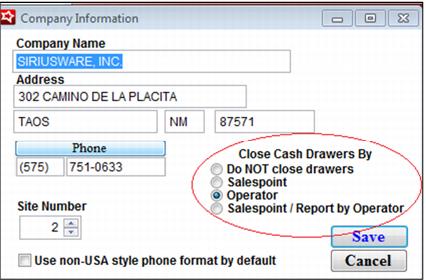
In order to use the Cash Management functionality and collect Skims, the Siriusware system must be configured to Close Cash Drawers. The method can be by Salespoint, Operator or Salespoint/Report by Operator (which is a slight twist to closing out by Salespoint and is only used in rare circumstances) in SysManager > Preferences > Company Information.
Skims can be collected for Cash, plus any other payment type configured for this purpose. To configure a payment type other than Cash as ‘skim-able’, edit the payment type in SysManager > Activities > Financial List > Payment Types and check the Enable Cash Management box.
The ability to perform skims is security controlled, along with the ability to change the bag number associated with the operator for whom the skim is being collected in SysManager > Preferences > Security.
.