How to use the “good for” ticket option
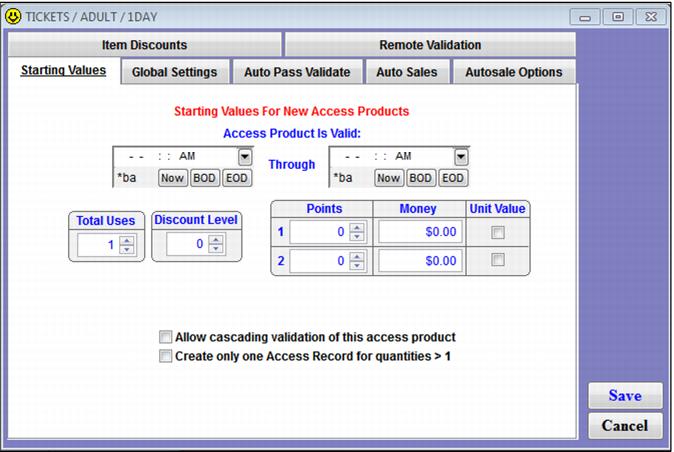
The SysManager > Activities > DCIs > New/Edit > Action tab > Access/Pass template > Starting Values tab > Create only one Access Record for quantities > 1 check box provides you with the ability to print a single ticket for a group.
Example:
A quantity of fifty group tickets sold on one line in Sales. One ticket is produced with one access record – the one access record is scanned and the quantity is used to set the admissions for that scan and to provide some sort of message to the operator/guest as to how many guests may pass through the entrance based on that scan. The ticket that prints also needs to show the total line item quantity for reference.
If an access ticket is set to ignore quantity (SysManager > Activities > DCIs > New/Edit > Printing tab > Ignore Qty check box is checked) and the Create only one access record for quantities > 1 box is checked, the ticket is printed once when sold and the access.good_for field is filled in correctly with the quantity sold for that record.
To use the one scan per line item functionality:
1. In SysManager > Activities > DCIs > New/Edit:
a. In the General tab, the ticket needs to be set with one admission.
b. In the Printing tab, attached the layout that has the line to show Good for...
Note: To accommodate this, the layout has a line similar to this: Good for'+' '+ALLTRIM(STR(access->good_for,5,0))+' '+'Visitor(s)
c. Also on the Printing tab, the box Ignore Qty needs to be checked.
d. In the Action tab, check the Create Access Record box.
Note: You can also use this functionality with passes.
e. In the Access Template, check the Create only one Access Record for quantities > 1 box
2. In Sales:
• When the ticket is sold, the field good_for in the access record is filled in with correct quantity.
• The ticket prints only one copy no matter what the quantity is.
• The ticket shows the message, “Good for <quantity>”.
3. ScanMan/GateKeeper – This is where validations occur. When the operator scans a ticket or pass of this type, the message, “Good for <quantity>” displays on the symbol scanner or on the GateKeeper screen. The operator can then physically count the number of group members to match the sold quantity.