The
SysManager >
Activities >
DCIs >
New/
Edit >
Action tab >
Create Pass radio button >
Action Specifics button >
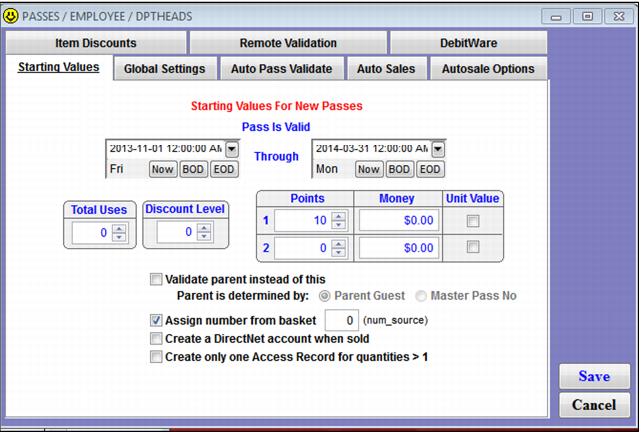
Starting Values tab sets the initial values of the pass at the time of sale. This includes values such as
Pass Is Valid dates,
Total Uses,
Points1,
Points2,
Money1 and
Money2. The
Total Uses,
Points and
Money fields can all be used to load value on the pass; this value is subsequently removed when the pass is auto-validated or validated with a DCI. This is also the tab where you configure the system to assign a sixteen digit card number to the pass record at the time of sale for use in programs such as In-House Cards (a.k.a., Debitware). Any values configured on the
Starting Values tab are stamped into the pass record at the time of sale and cannot be retroactively changed on existing pass records by changing the configuration on the
Starting Values tab for the pass DCI. For information about
Validate parent instead of this, see
Parent pass validation (auto validation option).
Note: See the
Salesware Memberships and Passes document for information about the
Discount Level spinner. See
Unit value programs (validation with a DCI option) for information about the
Unit Value check boxes.
An employee pass is loaded with 5 points at the time of sale. The employee pass item must be configured with 5 points on the Starting Values tab prior to selling any employee passes. If no points are configured on the employee pass item’s Starting Values tab, then all employee passes sold while the Points were set to 0 has 0 points. Changing the starting values on the employee pass item to 5 after employee passes have already been sold does not update the existing employee passes with 5 points. Instead, each pass that was sold when Points were set to 0 must be manually updated by looking up the pass records in SysManager.