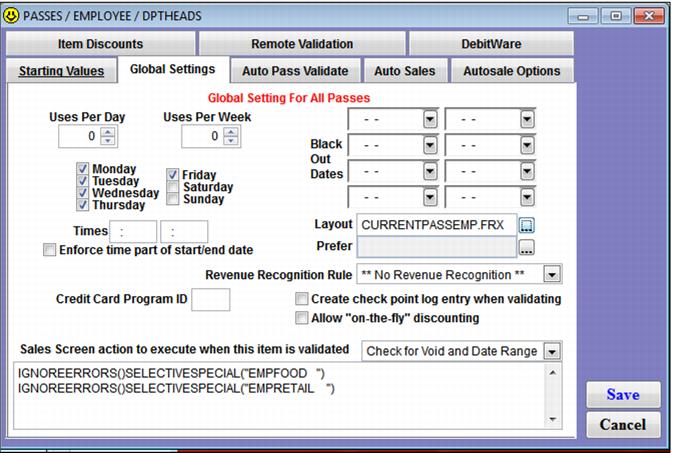
Global Settings tab
The Global Settings tab controls many actions associated with validation, both auto-validation and validation with a DCI. Basic restrictions for passes are created on this tab such as day of week and date range blackout periods. Additional values such as weekly and daily values can be loaded onto a pass within the Global Settings tab. Any configuration on the Global Settings tab affects all passes of that DCI – both existing passes and those yet to be sold.
Example:
An operator configures a Weekdays Only pass program. Several hundred Weekdays Only passes are sold. The operator realizes that she forgot to restrict the validation to Monday - Friday. The operator edits the Global Settings tab for the Weekdays Only pass DCI and un-checks the Saturday and Sunday check boxes. All Weekday Only passes, including those already sold, are now be restricted to Monday - Friday use.
The
Global Settings tab also is the area used to automate discounting in Sales with the swipe/scan of a pass. Automated discounting uses the macro
SELECTIVESPECIAL() for those specials specifically linked to certain items or
GLOBALSPECIAL() for those specials configured as Global Specials. The macro
IGNOREERRORS()always precede the special macros in order to prevent a message to the operator each time a special cannot be applied to an item in the sale (see
Applying Specials and/or Discounts for step-by-step instructions on setting up discounts with a pass swipe). For more information on macros, see
Salesware Sales Screen Action Macro Commands document.
Note: The Layout and Prefer fields are described in the Salesware Layouts document.
Example:
The marketing department decides to add a 15% discount on all food and a 10% discount on group lessons to the Weekday Only pass. The operator configures the appropriate specials: the FOOD special is a global special that is restricted to the cafeteria and the GRPLESSONS special is linked to specific lesson items. The operator enters IGNOREERRORS()GLOBALSPECIAL(“FOOD “)SELECTIVESPECIAL(“GRPLESSONS”) in the Sales Screen action to execute when this item is validated box. The operator also restricts this automated discounting to only those passes that are valid by selecting Check for Void and Date Range from the dropdown box.