Validation : Validation with a DCI (validation template) and validation products : Item/pass relationships functionality : Discounts based on the pass used for validation : Applying specials and/or discounts
 
Applying specials and/or discounts
 
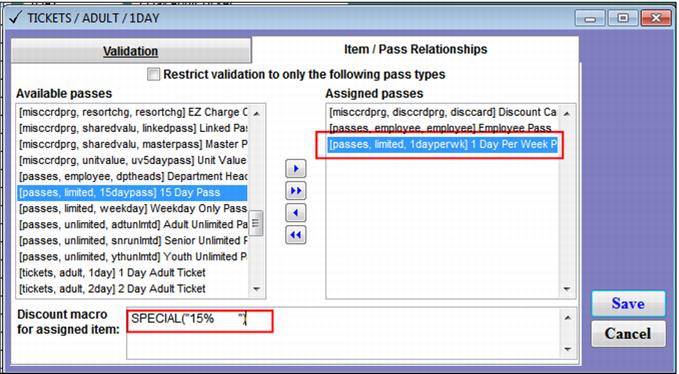
This option applies a special or discount to the item upon a successful validation. In the following example, three pass types apply varying discounts to the same item based upon a successful validation:
 
C:\Users\Jennifer Roth\Documents\DonationCoder\ScreenshotCaptor\Screenshots\Screenshot - 2013-07-17 , 12_42_18 PM.png
 
C:\Users\Jennifer Roth\Documents\DonationCoder\ScreenshotCaptor\Screenshots\Screenshot - 2013-07-17 , 12_43_57 PM.png


Although the example shown above uses the SPECIAL macro, there are other options available for altering the price of the item. The following table shows various approaches to altering the price using the SPECIAL and PRICE macros.
 
Macro
Action
SPECIAL("XXXXXXXXXX")
Applies the special specified between the quotes (special nickname padded out to ten characters).
SPECIAL("XXXXXXXXXX" , 10.00)
Applies the special name to the line and sets the item’s price to the specified amount. This adjusts the amount of the discount accordingly. In this example the special specified between the quotes is applied to the line, but the end price of the item is $10. A $50 item would show a $40 discount and a $100 item would show a $90 discount.
SPECIAL("XXXXXXXXXX", 5, 3.00)
 
In this example, special XXXXXXXXXX is applied to the item, a 5% discount and a $3 discount is applied to the item.
PRICE( 10.00 )
 
This example sets the price of an item to $10 and does not apply any special or calculate a discount amount based on the original price of the item.