Using the CHECKPOINTS macro
This macro checks the value held in the Points1 or Points2 field, applies a special based on the number of points, and then resets the points by a certain amount. This type of a macro is useful in “reward” programs. Although this same type of functionality is available with auto-validation programs using the Discount counter functionality, using validation with a DCI allows points to be accumulated from the purchase of an unlimited number of items as opposed to being limited to the auto-sale of a single item. (For instance, a point can be accumulated based on the purchase of entrance ticket or lessons.)
The following example is essentially a “buy six get the seventh free” type of program. The twist in this particular program is that the guest is allowed to decide when he would like to receive his free ticket. The guest can choose to immediately take the free ticket on the seventh purchase or he may choose to postpone receiving the free ticket. The guest is allowed to accumulate only 1 point per day.
Steps:
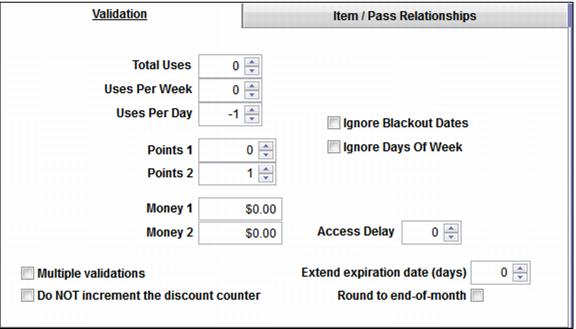
1. Adding and subtracting value on the Validation tab – The Validation tab deducts one daily use in order to limit the point accumulation to once per day. The Points 2 field adds a point with every successful validation.
Note: This means that the pass allowed to validate this item must be configured with 1 Uses Per Day on the Global Settings tab within the Action Specifics.
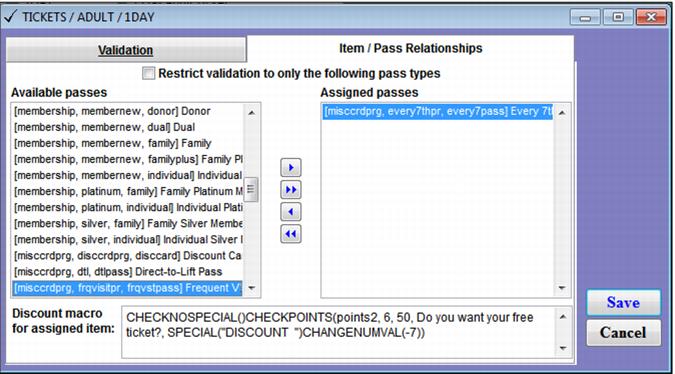
2. Configuring the discount macro on the Item/Pass Relationships tab. Enter this macro: CHECKNOSPECIAL()CHECKPOINTS(points2, 6, 50, Do you want your free ticket?, SPECIAL("DISCOUNT ")CHANGENUMVAL(-7))
Note: The value of the Points2 field must be between 6 and 50. If this is true, the operator is prompted to ask the guest if he would like to receive his free ticket. If the answer is YES to this question, the special is applied and the points are reset by 7. If the Points2 field is not between 6 and 50, the guest accumulates one point every day that his pass is used to validate a full price (non-discounted) item.