Using the EVERYX macro
This macro is very similar to the CHECKPOINT macro except that the guest does not have a choice to postpone receiving the discount and instead of resetting the point value, the discount is offered at regular point intervals. This macro can be useful when implementing reward programs.
In the following sample program, a pass holder receives a 15% discount on all ticket purchases except every fifth purchase is free. The pass holder may only receive one discounted ticket and one point per day.
Steps:
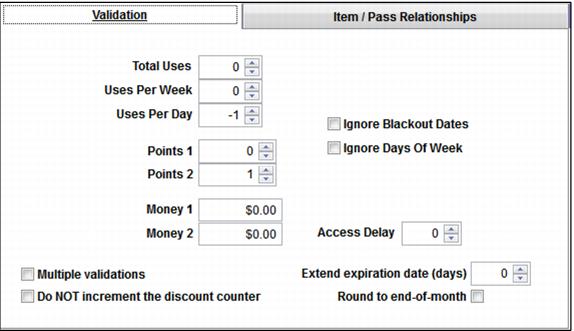
1. Adding and subtracting value on the Validation tab: The Validation tab deducts one daily use in order to limit the point accumulation to once per day. The Points 2 field adds a point with every successful validation.
Note: This means that the pass allowed to validate this item must be configured with 1 Uses Per Day on the Global Settings tab within the Action Specifics.
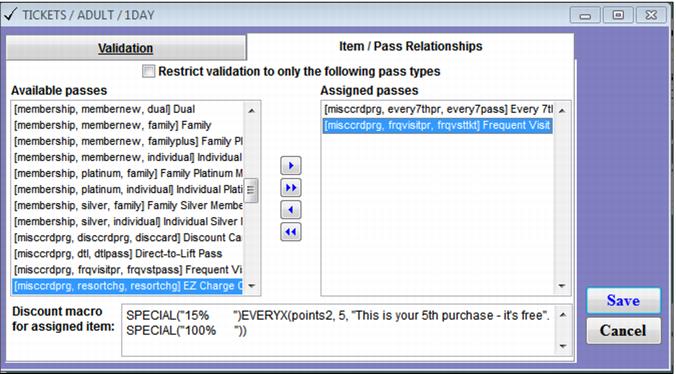
2. Configuring the discount macro on the Item/Pass Relationships tab – Enter this macro: SPECIAL("15% ")EVERYX(points2, 5, "This is your 5th purchase - it's free", SPECIAL("100% "))
Note: If the value of the Points2 field is a multiple of five, the operator is notified that the guest receives his free ticket and the “100%” special is applied to the item. If the Points2 field value is not a multiple of five, the “15%” special is applied.