Cascading validation with pass numbers
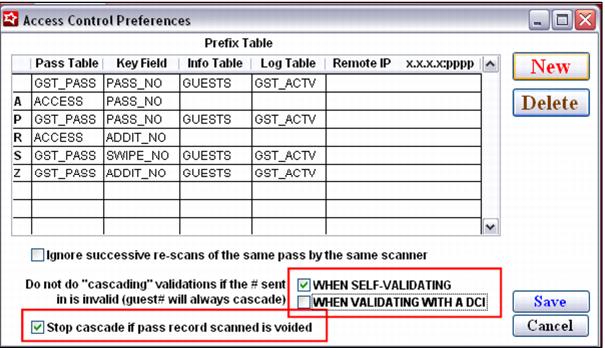
One of the greatest benefits of using pass numbers for validation is that cascading validation can be turned on or off for both auto-validation (referred to as “self-validating” in the SysManager > Preferences > Access Control Preferences) and programs that involve validation with a DCI.
The ability to alter the behavior of cascading validation per “validation type” can be helpful when customizing validation programs. Remember that auto-validation may occur in Sales or with remote scanning applications such as GateKeeper and ScanMan, while validation with a DCI only occurs in Sales.
Another option available with cascading validation is the ability stop cascading if a pass is lost or stolen. This is done by checking the SysManager > Preferences > Access Control Preferences > Stop cascade if pass record scanned is voided check box. With this capability, lost or stolen passes can be inactivated. The key is to enter something within the Voided by and/or Voided for fields of the pass record whose number is printed on the lost card. With this option activated, the Voided By/ Voided For fields are first checked for the pass record scanned. If they are populated, the cascade does not occur and the validation fails. If these fields are empty, the cascade proceeds as normal. Because the nature of cascading validation is to allow a single card be used for multiple seasons/years or for various programs, all other reasons that a pass may be invalid (expired, blacked-out, no uses remaining, etc.,) still trigger the cascade even with this option checked.