Cascading validation with card numbers
Validation with sixteen digit card numbers always results in cascading validation. There is no way to turn off cascading validation for either validation type when using card numbers, but the option to Stop cascade if pass record scanned is voided is available.
Card number validation is unique in that there is a bit more control surrounding the order in which passes are validated during cascading validation. Here is how it works:
• A card number is scanned.
• If the option to Stop cascade if pass record scanned is voided is active, then the pass record that contains the card number in the swipe_no field is verified to make sure that there is nothing in the Voided By and/or Voided For fields. If something is in these fields, the cascade is stopped and the validation fails.
• If the pass record that contains the card number has not been voided (assuming that the option to stop the cascade is active), then the cascade proceeds as normal.
• Normal cascading with card numbers first locates the guest record, and then generates a list of all passes owned by the guest.
• If validating with a DCI and restricting validation to only certain pass DCIs (within the Item/Pass Relationships tab within the validation template), the list of all passes owned by the guest is narrowed down to just those allowed to validate the item. This step only occurs when validating a product in Sales that restricts the types of passes allowed for validation.
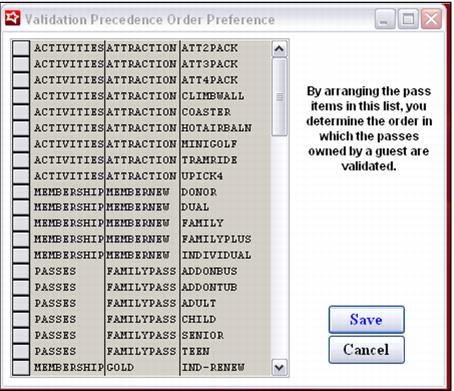
• The list of remaining passes is then ordered based on the SysManager > Preferences > Validation Precedence menu. The Validation Precedence menu option is used to define the order in which passes are validated. The order may be re-arranged by grabbing the square next to each item and dragging it up or down in the list.
The validation proceeds through the ordered list of passes until it finds a valid pass record.