Configuration options
Maintenance
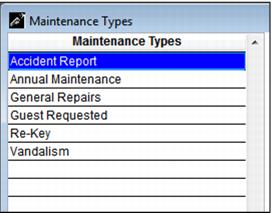
If the rental inventory needs to be put into maintenance, a list of maintenance reasons must be configured. A minimum of one reason is required. SysManager > Rental Lists > Maintenance Reasons.
Rental Inventory Number Displays
Add recap language tags to the ItemDesc, ItemDescFull .INI settings to display the rental inventory number: <saveinfo->rentitem>
Receipt layout field
Add a field to the Receipt layout that includes the rental inventory number: alltrans > rentitem
The scan to auto-sell a rental item (e.g., RI123) can be added into the item description or on a receipt. The ItemDescription uses the <saveinfo->rentitem> tag. For printing, rentitem is part of the alltrans table, so it can be added as alltrim(alltrans->rentitem) to a Receipt layout.
Accepting cash deposit or CC deposit
If the client wants to give an option to their guests to take either a cash deposit or CC deposit, follow these steps:
1. Create a Rental Deposit Cash item and set the Price of the deposit
2. Create a Rental Deposit CC item and set the Price of the deposit.
• SalesActions: OTHER()
• Required Fields: Credit Card Swipe
• Action: Create New Guest Record
3. Add the modifiers to the rental items, select Prompt/Required and set the Min/Max to 1
Main action button
You can create a main action button in Sales for the Basic Rental Inventory button. In the Sales32c.INI [Interface]
MainButtonXX=RNT