Sales .INI settings
There are several Reserved Seating Sales .INI settings.
• In order for the Sales to call the RSWebApp responsible for the seat booking process, the following must be added to a [ReservedSeating] section in the Sales .INI.
Example:
[ReservedSeating]
URL=http://localhost/ReservedSeating/
Note: URL=http://<Reserved Seating server>/<name of Reserved Seating directory installed under IIS>/
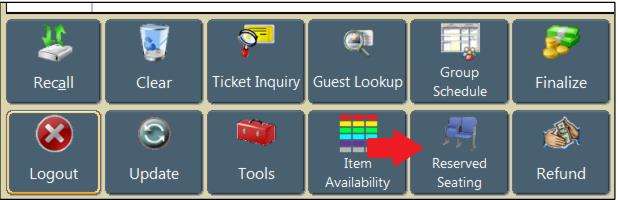
• A Main Action Button can be configured for Reserved Seating module using [Interface] MainButtonXX=SEA.
Example:
[Interface]
MainButton11=SEA
• Reserved Seating module information can be added to the [Preferences] ItemDesc and ItemDescFull settings in order to display relevant information to Sales operators. It can also be added to a [ReservedSeating] HeaderDesc setting to better describe the “item bundle” of tickets/seats included in a selected seat block.
• The following settings are used to conditionally display Reserved Seating module information only when the item being viewed is a Reserved Seating item:
<ifresseating> … </ifresseating> - adds Reserved Seating info only if the item is a Reserved Seating item
<ifrsseries> ... </ifrsseries> - adds Reserved Seating info only if the item is a series item
<forrsshows> … </forrsshows> - adds information related to each show in the item bundle or series
• Next, the following information can be included inside of the <ifresseating>, <ifrsseries> and <forrsshows> tags:
<cr> - used to insert a carriage return/new line
<resseating->prods> - production description
<resseating->shows> - show description
<resseating->series> - description of the series
<resseating->performers> - performer
<resseating->levels> - level where the seats are located
<resseating->sections> - section where the seats are located
<resseating->rows> - row where the seats are located
<resseating->seatlabels> - description, typically a letter or number, of the seats
<resseating->seatnumbers> - internal database number representing the seat label
<resseating->numshows> - number of shows included in the item bundle
<resseating->numseats> - number of seats included in the item bundle
<resseating->numtickets> - number of seats multiplied by the number of shows
Example:
This ItemDescFull setting results in a display similar to the following for a two Show Series.
[Preferences]
ItemDescFull=<items->descrip><cr><ifresseating>Tickets: <resseating->numtickets><cr><forrsshows> <resseating->shows> on <resseating->showtimes> Seats: <resseating->rows> <resseating->seatlabels><cr></forrsshows></ifresseating>
Example:
This sample HeaderDesc setting results in a display similar to the following in the Item Bundle Header.
[ReservedSeating]
HeaderDesc=<resseating->numshows> Show(s) - <resseating->numseats> Seat(s) located at <resseating->levels> / <resseating->sections> / row <resseating->rows> seats <resseating->seatlabels>
Note: The item description in the E-Commerce cart includes the show Description and Show Time for Single Show bookings; the item description in the E-Commerce cart includes the Series Description for Series bookings.